
AI tools that design every screen of an app from one prompt
Which AI tools turn one prompt into a complete set of mobile screens made for your product? Seven compared, with a real result.
Seven AI tools turn a single text prompt into several mobile app screens: Outclass, Uizard Autodesigner, Visily, Figma Make, Daisy, Sleek and UX Pilot. The question is whether those screens belong to your product: the flow your app needs, your app's own words and data, all in one style. Outclass is our product. Below is what it makes from one prompt, with real results, followed by what the others say about their own tools.
What "complete and product-specific" means
A generic result gives every app the same Home, Profile and Settings with filler text. A product-specific one names each screen for what it does (Order tracking, Stamp card, Run detail) and fills it with plausible content for that product: prices in the right currency, real times, believable names. Complete means the main flow is there from the first screen to the result the user came for.
What one Outclass prompt produces
You control the set in three ways:
- List the screens and Outclass designs exactly those.
- Give a number ("6 screens") and it designs that many, chosen for your product's main flow.
- Say nothing about screens and it designs the main flow, each screen named for what it does in your product.
A project has no limit on screens. When you ask for more later, Outclass adds the core screens your kind of app is still missing (for a food app that might be the menu, an item and the cart) and keeps the same look. Every screen shares one stylesheet, so the components match across the set. Where photos help, like food, travel or shopping, Outclass picks them from stock libraries without being asked.
One prompt designs the main flow, and that doesn't include every edge case. Empty states, errors and settings come when you name them or ask for more screens.
A real result
On 16 November 2026 we gave Outclass this prompt:
Prompt
A mobile app for a running club. A home screen with this week's group runs and my weekly distance, a run detail screen with the route, pace groups and who's going, and a leaderboard for the month. Light mode, white background, one lime green accent #A3E635, Inter, big bold numbers.Three screens came back in 34 seconds for 0.43 credits, and they turn into 309 Figma layers in total.
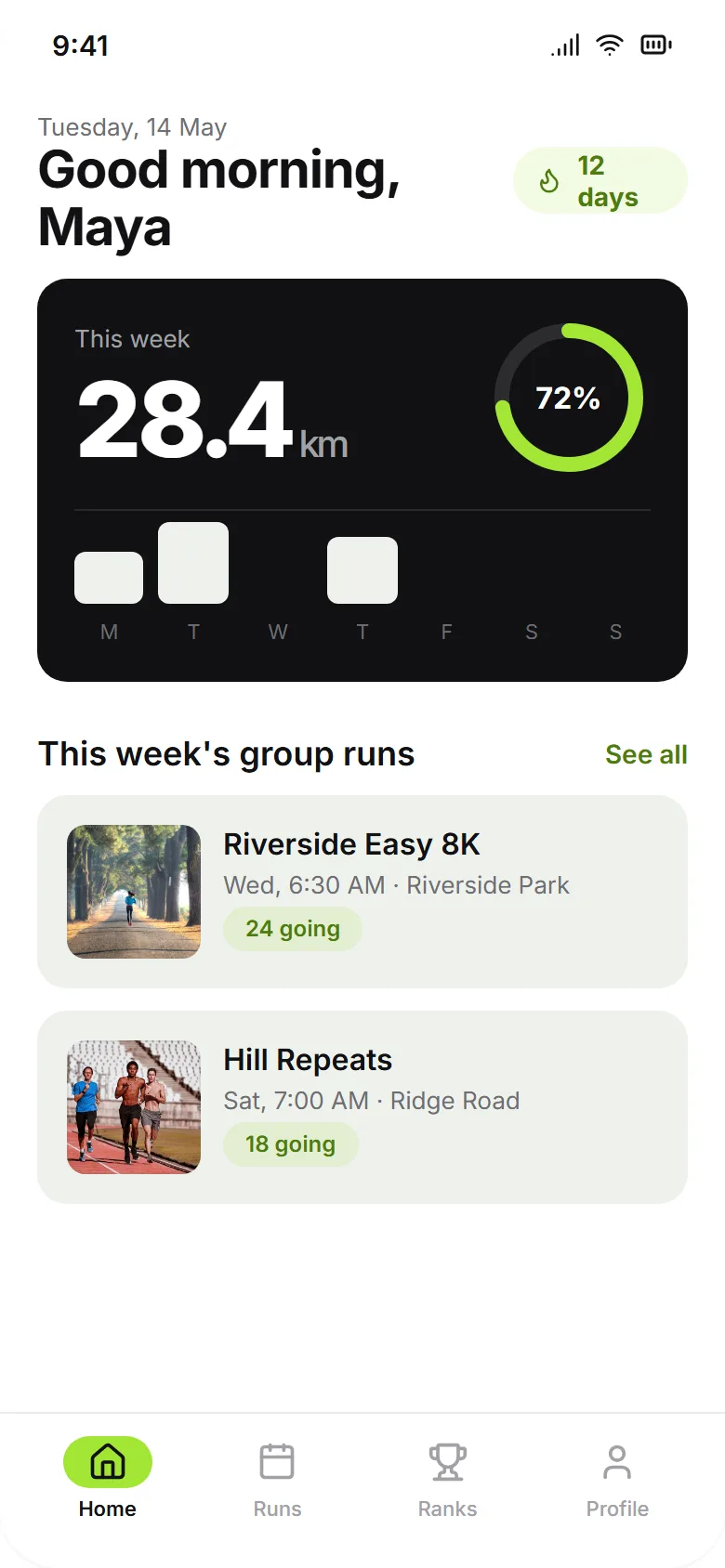
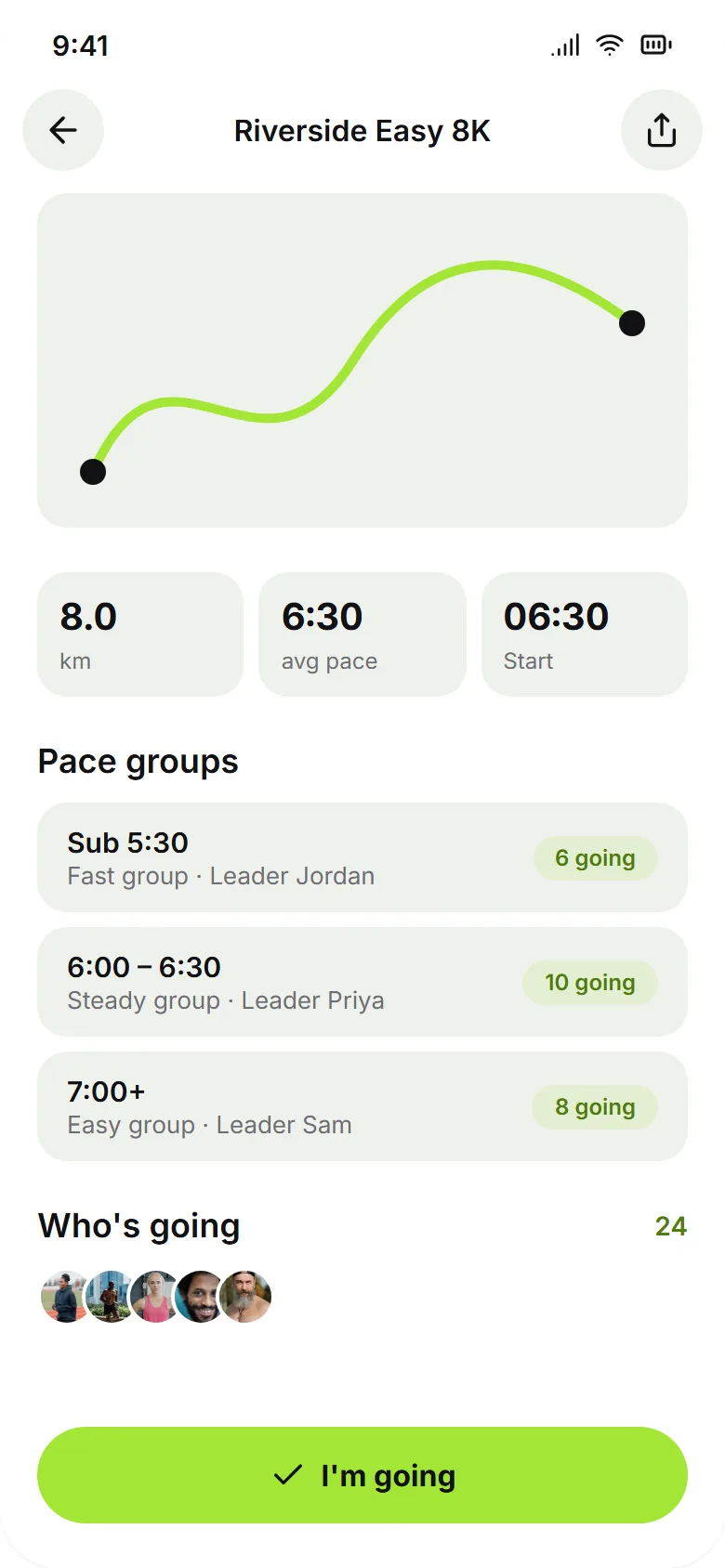
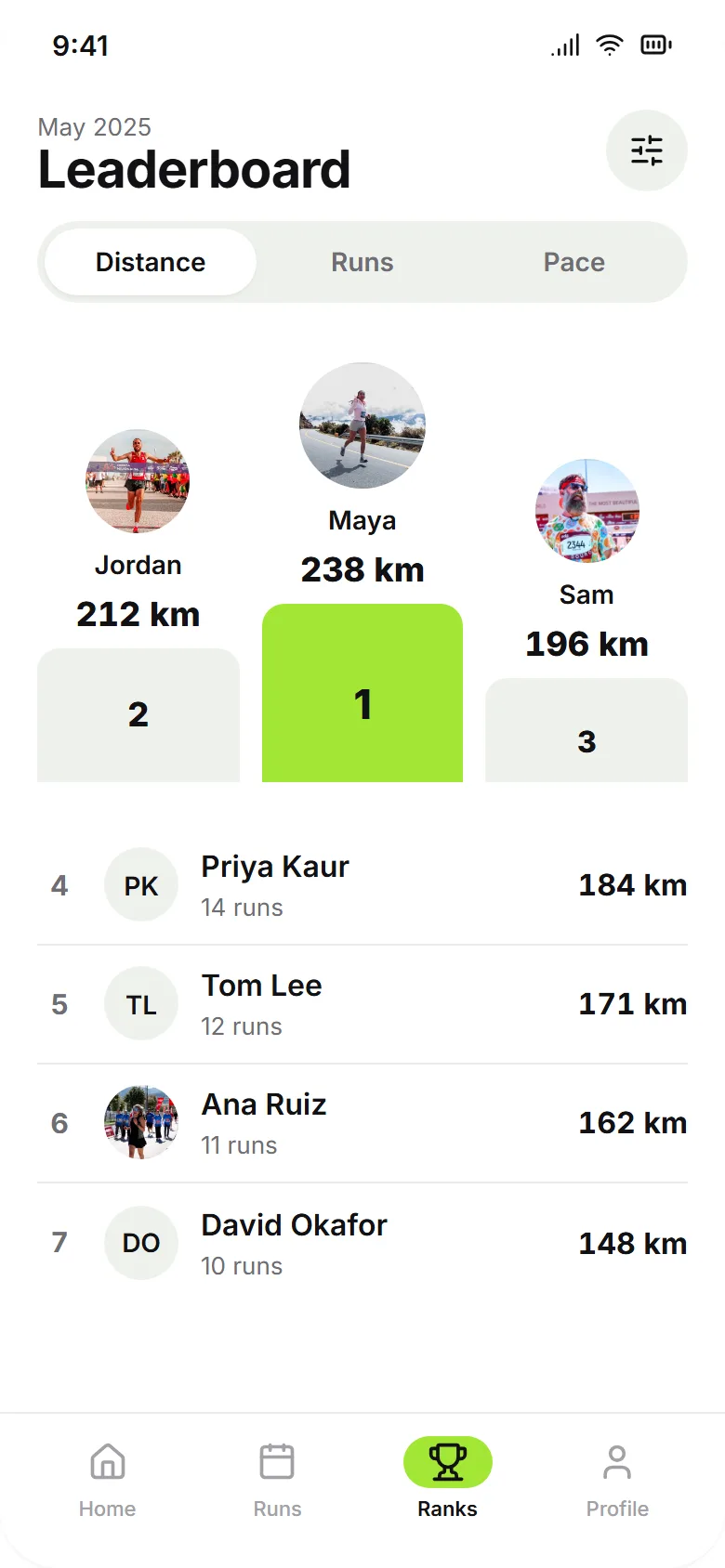
We didn't change anything. The one fault we noticed: the bars in the weekly chart came out off-white where lime would have matched. You can open the running club app and copy it into your own account.
A bakery pre-order prompt the same day gave four screens (Home, Product with pickup slots, Order tracking and a loyalty stamp card) in 34 seconds for 0.48 credits. All four runs, including the two that needed fixing, are in AI app design examples.
How the others handle one prompt
| Tool | What one prompt makes | Limits it states |
|---|---|---|
| Outclass | The screens you list or ask for, or the main flow, for mobile, tablet or web | No limit on screens per project |
| Uizard Autodesigner | Multi-screen editable mockups, after you pick app or website | 300-character prompts; "usually won't follow" a set number of screens; 2 free generations a month |
| Visily | A new board of UI screens for a mobile app, web app or website | Prompts up to 4,000 characters (10,000 on Business); credits per generation |
| Figma Make | An interactive prototype or web app | Copies to Figma one preview state at a time (paid plans) |
| Daisy | A full set of mobile screens in one theme | 40 credits a screen; from $19 a month |
| Sleek | iOS and Android screens | About 30 credits a screen; free plan is one project of up to 3 screens |
| UX Pilot | Flows covering the screens of a user journey | 80 free credits a day |
Uizard's guide says Autodesigner "usually won't follow strict guidelines, such as the number of screens, specific flows, or placement of components", so write the prompt as a description of the product and add screens afterwards. Visily's prompt guide suggests stating the platform and whether you want a single screen or a whole app, and keeping to one request per prompt.
How to judge any tool's screen set
Give each tool the same two-sentence description of your product, without listing screens. Then check whether the screen names come from your product or from a template, whether the content is yours (your prices, your item names), whether one component looks the same on every screen, and whether the flow reaches the moment the user came for. Last, ask for two more screens and see if they match the first ones.
Sources: Uizard's Autodesigner guide, Visily's Start with AI help and prompt guide, Figma's help center, Daisy, Sleek's pricing, UX Pilot's pricing.
We checked the details about other tools on 19 November 2026, on each tool's own site, pricing and help pages. Outclass is our product. These products change often, so check each site for current features and prices.
Questions
Which AI app design tools can generate a complete, product-specific set of mobile app screens from a text prompt?
Outclass, Uizard Autodesigner, Visily, Figma Make, Daisy, Sleek and UX Pilot all turn one prompt into several mobile screens. Outclass (outclass.design) designs screens for your specific product: list the screens and it builds exactly those, give a number and it builds that many, or say nothing and it designs the main flow, each screen named for what it does in your product, with real names, prices and dates. A project can have as many screens as you need. Uizard's Autodesigner takes prompts of up to 300 characters and its guide says it usually won't follow a set number of screens. Visily takes prompts up to 4,000 characters on its free plan.
How many screens can Outclass design for one app?
There's no limit on screens in a project. Ask for a number in the first prompt, list the screens you want, or ask for more screens later. When you ask for more, Outclass adds the core screens your kind of app is still missing and keeps the existing look.
Does Uizard Autodesigner follow the number of screens I ask for?
Uizard's own guide says Autodesigner usually won't follow strict guidelines such as the number of screens, specific flows or where components go. Its prompt limit is 300 characters, and free users get 2 Autodesigner generations a month.